Co-Parenting App vs Spreadsheet: Which Should Track Your Shared Expenses?
The search that brings most people here is not really which tool is better. It is one of two much more specific problems.
Either: the other parent will not sign up for anything, so the app everyone recommends is useless to you. Or: you are looking at a recurring annual cost, multiplying it by the number of years until your youngest turns eighteen, and wondering whether a subscription is genuinely necessary for what is, at bottom, arithmetic.
Full walkthrough of the template used in this guide.
Both are good questions. Here is an honest read on each, including the cases where the app is clearly the right call.
Where the App Genuinely Wins
Four capabilities, and a spreadsheet has none of them.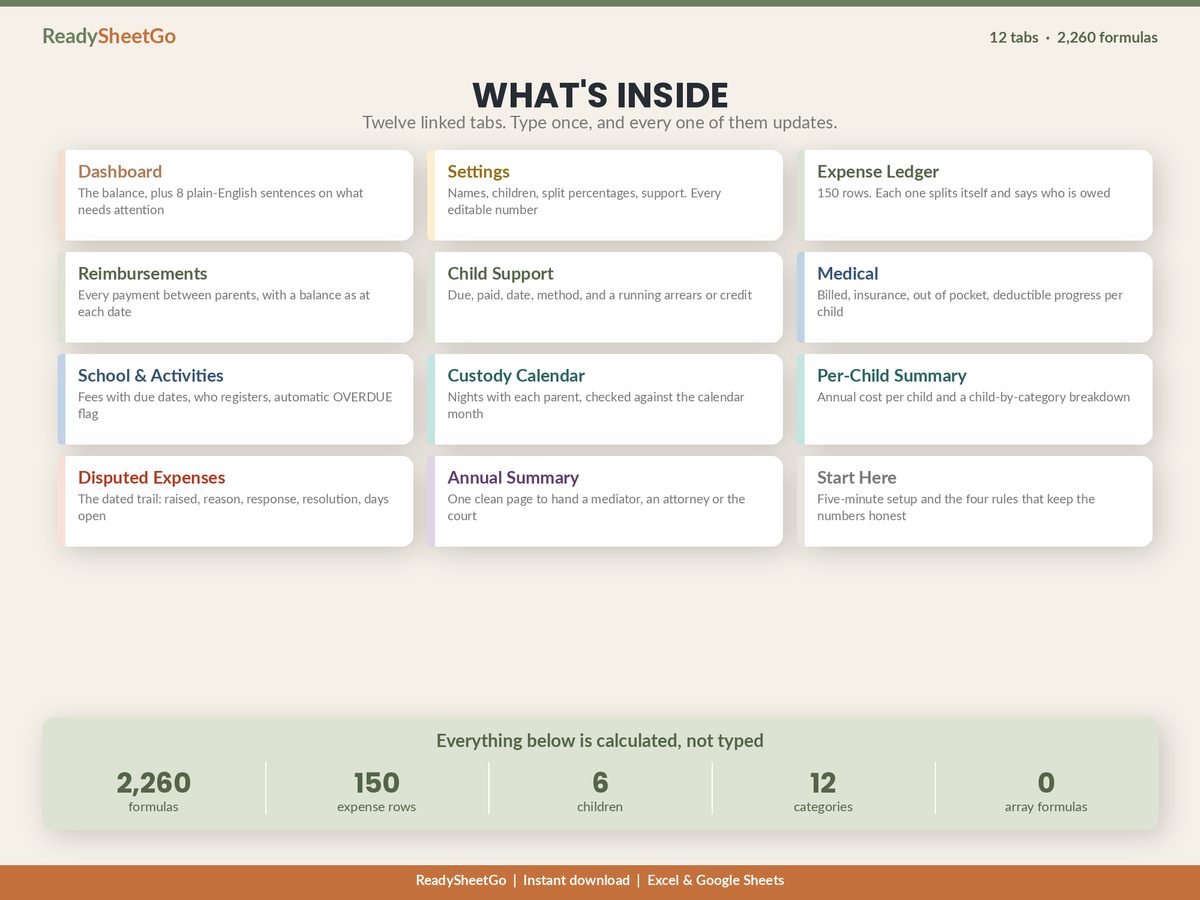
Independent entry by both parents. Each parent logs in and adds their own expenses to a shared record. No file gets emailed, no version gets forked, and neither of you is the custodian of the other’s data. If both parents are willing to participate, this is a real advantage and it removes a recurring source of friction.
Tamper-evident timestamps. Entries and messages are recorded by a third party with times neither of you can edit afterwards. This is the property that matters in a high-conflict situation, and it is the one a spreadsheet fundamentally cannot replicate, because a file on your computer has whatever dates you typed into it.
Notifications and a delivery record. A reimbursement request arrives as a notification with a record that it arrived. “I never saw that message” stops being available as a position.
Receipt capture at the till. Photograph the receipt at the moment of purchase and it attaches to the entry. Documentation that requires no later step is documentation that actually happens.
If a court order or your agreement names a platform, that settles it — use the platform. And if the problem you are solving is communication itself needs a neutral record, an app is the correct tool and no spreadsheet will substitute for it.
Where the Spreadsheet Wins
It works when the other parent will not participate. This is the decisive one. An app with one account is an expensive notepad. A spreadsheet does not care whether the other parent engages — you keep a complete, dated, receipted record of your side, and you can hand over a one-page summary whenever it is needed. For a large share of separated parents, this alone ends the comparison.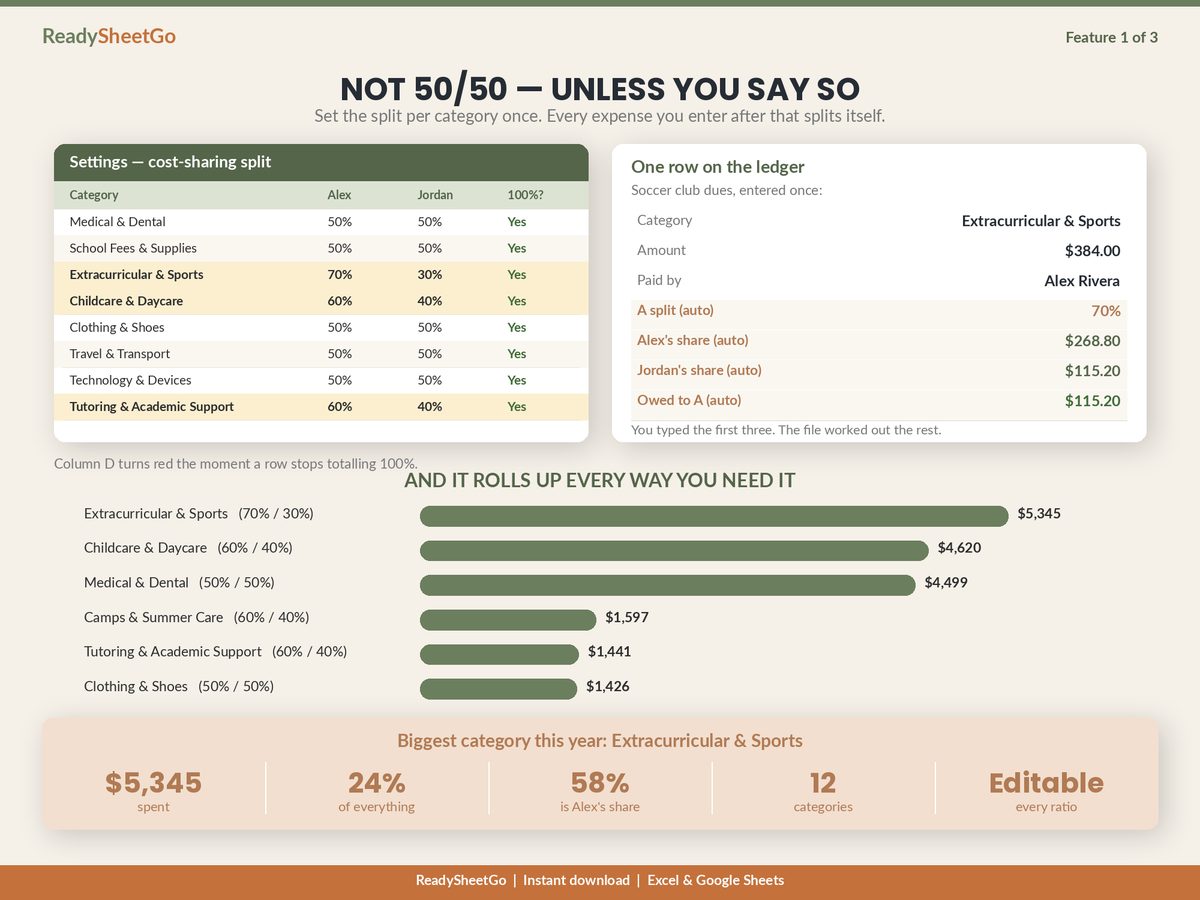
Split ratios per category. Most apps model shared expenses with a percentage split, but real agreements often carry a different ratio for each category — medical evenly, childcare pro-rated to income, one activity at 70/30 because one parent wanted it more. A sheet holds a ratio per category as a matter of course. The proration arithmetic is here if you are setting yours for the first time.
You own the file. Your history is not behind a login, cannot be locked by a lapsed payment, and does not need anyone’s export function to leave.
It answers modelling questions. What did this child cost this year? What is the balance as it stood in April? What is our medical spend against the deductible? Logging tools record; a spreadsheet calculates.
It costs once.
The Cost, Over the Years You Actually Have Left
This is the arithmetic people are usually doing in their heads, so here it is written down. Subscription pricing in this category varies and changes, so treat these as illustrative bands rather than any particular product’s price — find the real figure for the app you are considering and read across the matching row.
One parent subscribing: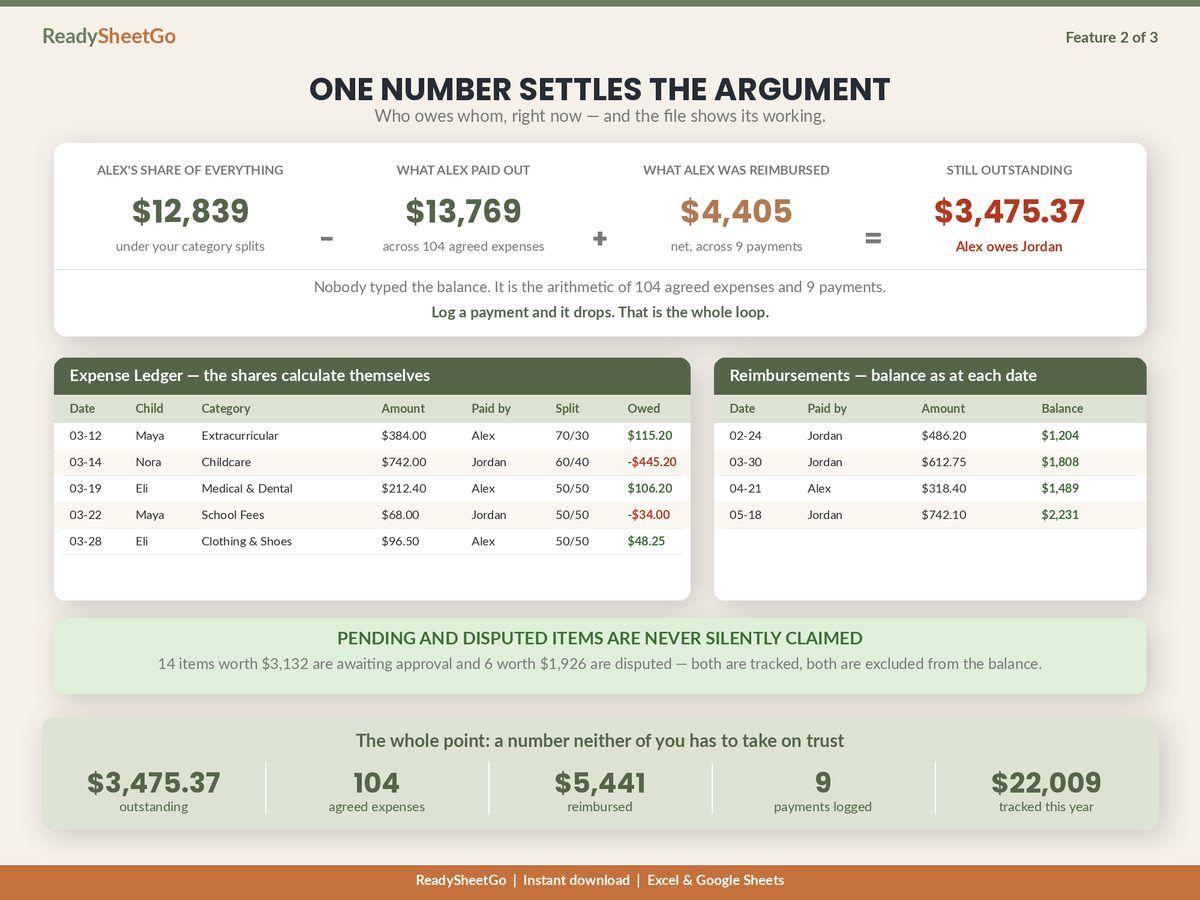
| Annual cost | Over 5 years | Over 10 years | Over 15 years |
|---|---|---|---|
| $60 | $300 | $600 | $900 |
| $100 | $500 | $1,000 | $1,500 |
| $150 | $750 | $1,500 | $2,250 |
| $200 | $1,000 | $2,000 | $3,000 |
Both parents subscribing — which is what makes the app work at all — doubles every figure in that table. At $100 a year each over the twelve years from a six-year-old to adulthood, that is $2,400 of household money spent on recording the arithmetic rather than on the children it concerns.
Against that, a one-time file is a rounding error. Whether it is the right call depends entirely on whether you need the four capabilities in the first section — not on the price.
The Honest Decision Tree
| Your situation | The answer |
|---|---|
| A court order or agreement names a platform | Use the named platform |
| Communication itself needs a neutral, tamper-evident record | App |
| High conflict, frequent disputes, likely to end up in front of someone | App, with a sheet alongside for the arithmetic |
| Both parents cooperative and both willing to sign up | Either — pick on price and preference |
| The other parent will not create an account | Spreadsheet |
| Cooperative, but you want the balance to be indisputable | Spreadsheet |
| Your agreement uses different ratios per category | Spreadsheet, or a sheet alongside the app |
| Cost is the binding constraint | Spreadsheet |
Notice how many rows resolve to both. Using an app for communication and anything court-facing while running a spreadsheet for the money is not a compromise — it is arguably the strongest setup, because the two tools are good at genuinely different things.
If You Go the Spreadsheet Route, Build These Four Things
A shared-expense file only beats an app if it is built properly. Four properties do nearly all the work:
A ratio per category, not one global percentage. Otherwise you are forced to choose between matching your agreement and keeping the file usable.
A status on every row. Pending by default; only Agreed items count toward the balance. Disputed and pending items stay logged, dated and visible, reported as excluded. This is what makes your number credible to the other parent — it visibly under-claims by construction.
A payment log separate from the expense ledger. Expenses in one place, transfers between parents in another, the balance derived from both. Merging them is how the same money gets counted twice.
A summary that prints to one page. With totals, each parent’s contribution and share, the outstanding balance, and what was excluded and why. If you ever need to hand your records to a mediator or an attorney, the format that survives being read by someone else matters more than the volume of detail behind it.
None of this is legal advice, and none of it interprets your custody order — what to keep and what will be accepted in your jurisdiction is a question for your own attorney or mediator.
The Thing Worth Remembering
Ask what problem you are actually solving. If it is we cannot communicate without a witness, buy the app. If it is nobody can agree what the balance is — or the other parent won’t sign up — a properly built spreadsheet solves it once, for the price of a takeaway, and keeps working whether or not anyone else cooperates.
The full build, worked end to end on a six-month example, is here.
Featured on ReadySheetGo
Co-Parenting & Blended Family Shared Expense Tracker — $14.99
Twelve linked tabs and 2,260 working formulas, bought once, with a full fictional sample year already loaded so you can see it running before you type anything.
The Settings tab holds both parents, up to six children, and a split percentage for every one of twelve categories — so childcare can be pro-rated while medical splits evenly, with a check that turns red the moment a category stops totalling 100%. The Expense Ledger gives you 150 rows, each splitting by its own category’s ratio, with a status on every row so only Agreed items reach the balance and nothing is ever silently claimed. Reimbursements logs transfers between parents with the balance as it stood on each date.
Child Support tracks due against paid with a running arrears-or-credit figure. Medical holds billed, insurance paid, out of pocket and deductible progress per child. School & Activities carries due dates and an automatic OVERDUE flag. The Custody Calendar counts nights with each parent by month. Per-Child Summary returns annual cost per child. Disputed Expenses keeps the dated trail, and Annual Summary prints the whole position onto one page with signature lines.
No subscription, no per-seat pricing, and no account required from anyone else. No macros, no add-ons and no array formulas — it calculates identically in Excel and Google Sheets, on a desktop, a tablet or a phone. It organises your own records; it is not legal advice and does not interpret your custody order.
Get the Co-Parenting & Blended Family Shared Expense Tracker →
Frequently Asked Questions
What can a co-parenting app do that a spreadsheet cannot?
Four things, and they are real. It gives both parents their own login so each can enter expenses independently without sending a file back and forth. It timestamps entries and messages in a way neither party can later edit, which is the property courts and mediators care about. It sends notifications, so a request cannot be ignored on the grounds of not having seen it. And it captures receipts from a phone at the moment of purchase. If any of those four is the actual problem you are trying to solve, a spreadsheet will not solve it.
What can a spreadsheet do that an app cannot?
Work when the other parent refuses to participate — which is the single most common reason people go looking for an alternative in the first place. An app needs both accounts to be useful; a spreadsheet needs nobody's permission and still produces a complete, dated, printable record of your side. Beyond that, a sheet lets you set a different split ratio for every category rather than whatever the app's model allows, costs nothing per year, works offline, and leaves you owning the file rather than renting access to your own history.
Do courts require co-parents to use a specific app?
Sometimes, and where that is the case it settles the question entirely — if an order or agreement names a platform, use it. Outside of that, what generally matters is whether a record is contemporaneous, consistent and supported by receipts, rather than which software produced it. Your own attorney or mediator is the right person to tell you what will be accepted in your situation, because this varies enormously by jurisdiction and by the specifics of your order.
Can you use both an app and a spreadsheet?
Yes, and plenty of people do. The common pattern is the app for communication and anything court-facing, and a spreadsheet for the arithmetic — the per-category split ratios, the running balance, the annual cost per child, the one-page summary. Apps tend to be built around logging and messaging rather than modelling, so a sheet alongside is often what answers 'what is the actual balance right now' and 'what did this child cost us this year'.