The Meal Planning Spreadsheet That Auto-Generates Your Grocery List by Aisle
If you meal plan, you already know the most tedious part isn’t deciding what to eat — it’s the twenty minutes afterward spent copying ingredients off each recipe, combining the duplicates, crossing out what you already have, and rewriting the whole thing into something you can actually shop from. Do that every single week and it starts to feel like a part-time job. Skip it, and you’re back to wandering the aisles guessing.
There’s a better way, and it doesn’t require an app subscription. A well-built spreadsheet can generate your entire grocery list automatically from the meals you select — combined, de-duplicated, and sorted by store section — so the list writes itself while you just pick dinners. Here’s how it works and why it beats both handwritten lists and most meal-planning apps.
The Problem With Handwritten Grocery Lists
A manual list has three built-in failure points, and every one of them costs you money or time.
First, duplication. Four meals each call for onions, so you either write “onions” four times or lose track and buy too many. Either way something rots.
Second, omission. You forget the garlic that only one recipe needed, discover it mid-cooking, and either make a special trip or ruin the dish. USDA data pegs household food waste near a third of everything bought — a lot of that is ingredients purchased for meals that never got made because something was missing.
Third, disorganization. A list written in the order recipes came to mind sends you crisscrossing the store — dairy, produce, back to dairy, over to frozen, back to produce for the thing you forgot. That’s how a 25-minute trip becomes 50.
An auto-generated, aisle-sorted list eliminates all three at once.
How Auto-Generation Actually Works
The mechanism is simpler than it sounds. In a meal planner spreadsheet, you store each recipe once alongside its full ingredient list — quantities, units, and which store section each ingredient belongs to. That’s a one-time setup per recipe.
From then on, your weekly meal plan uses dropdown menus: for each day and meal slot, you select a recipe from the list you’ve already built. The moment you make those selections, formulas do the work behind the scenes — they look up every ingredient for every chosen meal, add up the quantities (so four meals’ worth of onions become one line), and drop the combined result onto a grocery list tab. Because every ingredient is tagged with a store section, the list comes out already grouped: all your produce together, all your dairy together, all your pantry staples together.
You didn’t write a list. You picked seven dinners and the list appeared.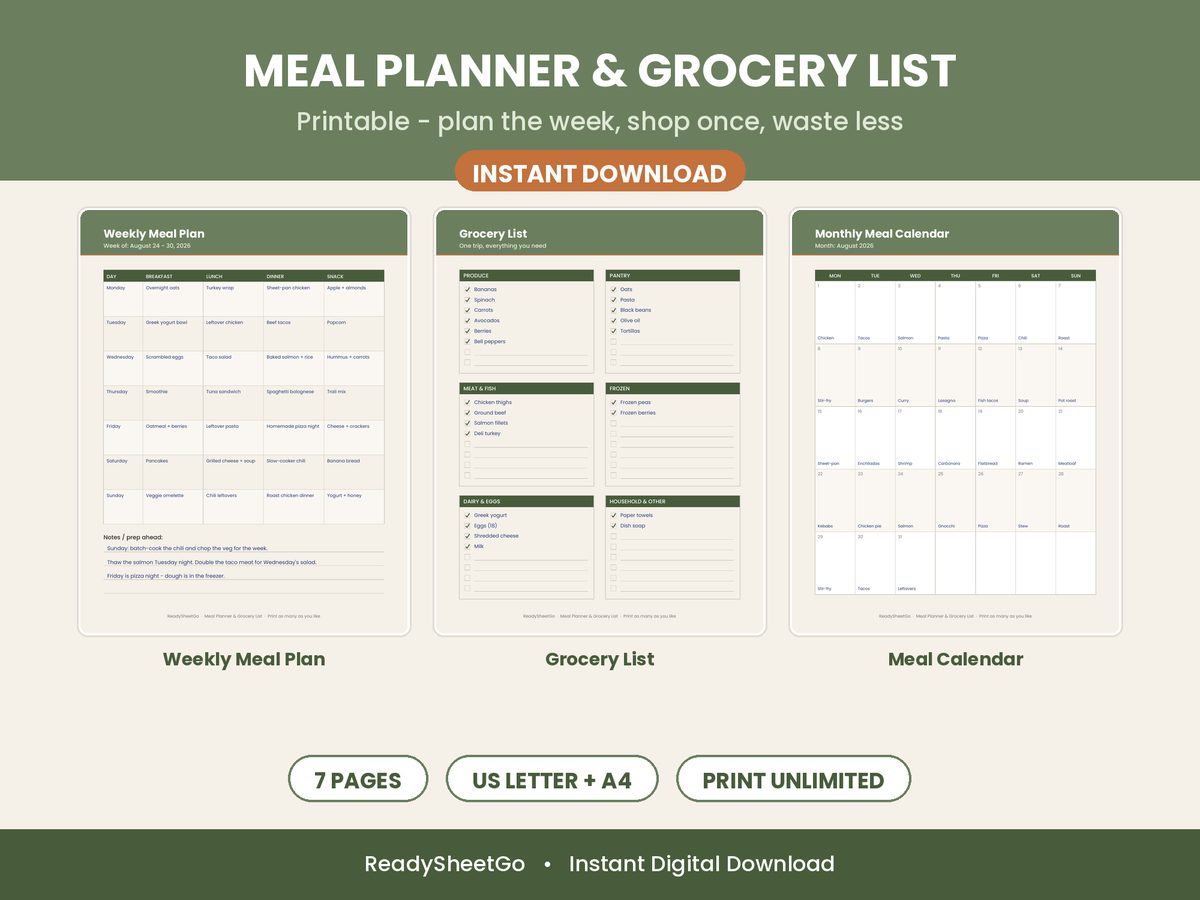
The Pantry Layer: Buy Only What You Actually Need
A great grocery list doesn’t just tell you what your meals require — it tells you what you’re missing. The upgrade that saves the most money is cross-referencing the generated list against a pantry inventory.
When the spreadsheet knows you already have rice, canned tomatoes, and half a bag of frozen peas, it can split the shopping list into two clear columns: need to buy versus already have. You shop only the first column. That single feature quietly prevents the most common grocery leak there is — re-buying staples you forgot you owned, which for most households is $50 to $100 sitting in the cabinet at any given time.
Why Aisle Organization Matters More Than You’d Think
Grouping a list by store section feels like a small nicety until you time yourself. A shopper with a random list backtracks constantly and, more importantly, is far more likely to walk past the impulse-buy endcaps twice. A shopper clearing one section at a time moves in a straight line, spends less time exposed to tempting extras, and finishes faster.
The time savings are real — commonly 15 to 30 minutes per trip — but the money savings from less impulse exposure add up just as much over a year of weekly shops.
Spreadsheet vs. App: Why the Sheet Wins for This
Meal-planning apps exist, and some auto-generate lists too. But they come with trade-offs: monthly fees, a locked recipe database you don’t fully control, ads, and math that’s hidden from you. A spreadsheet flips all of that. You own the file forever with no subscription, you can see and edit every recipe and formula, and it works in tools you already have — Excel on the desktop, Google Sheets free with any Google account.
And it travels. Drop the file into Google Drive, open it in the Sheets app, and your aisle-sorted list — with the pantry split intact — is on your phone at the store. No new app to learn, no account to create.
Set It Up Once, Coast Every Week After
The honest catch is the initial setup: you have to enter your recipes and their ingredients the first time. Budget an hour to load in the 15 or 20 meals you actually rotate through. After that, every future week is just picking meals from dropdowns and watching the list build itself — the effort curve drops to almost nothing, which is exactly why this system sticks when handwritten lists don’t.
Featured on ReadySheetGo
The Meal Planner Spreadsheet with Grocery List Template stores up to 50 recipes and links every one to its ingredients, so your weekly grocery list auto-generates the instant you pick meals from the dropdown menus. It combines duplicate ingredients, sorts everything by store aisle, and splits the list into what you need to buy versus what’s already in your pantry inventory. 10 tabs including a recipe book, pantry tracker, and grocery budget, powered by 1,288 formulas. Works with Excel and Google Sheets — including on your phone. One-time purchase — $12.99 instant download (currently $7.79 with code LAUNCH40).
Frequently Asked Questions
Can a spreadsheet automatically generate a grocery list from my meal plan?
Yes. A properly built meal planner spreadsheet links each recipe to its ingredients, so when you select meals for the week from dropdown menus, formulas pull every ingredient, combine duplicates, and output a single shopping list. You pick the meals; the list assembles itself. The best versions also organize the list by store aisle and separate what you need to buy from what's already in your pantry.
How does a grocery list organized by aisle save time?
Shopping in a random order means backtracking across the store — you grab milk, walk to produce, then remember you needed cheese back in dairy. A list grouped by section (produce, meat, dairy, pantry, frozen) lets you clear one area completely before moving on. Shoppers who use an aisle-organized list routinely cut 15–30 minutes off a trip and are far less likely to forget an item and have to return.
Do I have to rebuild my grocery list every week?
Not if your list is generated from your meal plan. When your recipes and their ingredients are stored once in the spreadsheet, each new week is just picking different meals from the dropdowns — the grocery list regenerates itself instantly. You only ever enter a recipe's ingredients one time, no matter how many weeks you cook it.
Does a meal planner spreadsheet work on my phone at the store?
Yes, if it's built in Excel or Google Sheets. Upload the file to Google Drive and open it in the Google Sheets app, and your auto-generated grocery list is in your pocket at the store — with checkboxes and the aisle grouping intact. No separate app, subscription, or account beyond the Google login you already have.