Employee Scheduling Software vs a Spreadsheet: Which a Small Team Actually Needs
The question usually arrives after something goes wrong. A shift went uncovered, three people texted at once about swapping Saturday, or payroll came in higher than expected. The instinct is that the spreadsheet failed and it is time to pay for proper software.
Sometimes that is right. Often the spreadsheet did not fail — it was being asked to do a job it structurally cannot do, and no amount of better formulas would have helped.
Knowing which of the two you are in is worth a few hundred dollars a year, every year, forever.
What Each One Is Genuinely Good At
Spreadsheet
Scheduling software
Cost
One-off, or free
Per employee, per month, indefinitely
Setup
An afternoon
Days, plus importing staff and rates
Hours and overtime maths
Yes — and you can see the formula
Yes
Cost of the schedule as you build it
Yes
Usually, on paid tiers
Coverage by role against a minimum
Yes
Yes
Labour % of revenue
Yes
Sometimes, often a higher tier
Four-week trend and role mix
Yes
Varies, often weak
Push the schedule to staff phones
No
Yes
Employee-initiated swaps and open shifts
No
Yes
Timeclock: scheduled vs actually worked
No
Yes
Audit trail of who changed what
No
Yes
Works if you stop paying
Yes, forever
No
Bends to an odd business
Completely
Only where the vendor allows
Read the four bold rows. That is the entire case for software, and it is a real case — a spreadsheet cannot be made to do any of them, at any headcount, no matter how well built.Employee Schedule Shift Planner spreadsheet - what's inside
Now read what is above them. All of it is arithmetic, and a decent sheet does arithmetic with one advantage that gets consistently undersold: you can open the cell. When an app tells you the week costs $6,289, you take its word. When your own file says it, you can check whether the rate behind it is still the rate you agreed in June.
The Four Thresholds
Headcount is the wrong test — plenty of businesses run thirty people from a sheet and plenty of eight-person teams genuinely need an app. Capability is the right test. Cross any of these four and a spreadsheet stops being enough.
1. Staff need the schedule on their phones, and need to know when it changes. A printed rota on the break-room wall works when everyone comes in daily and the schedule rarely changes after posting. It fails when half the team is part-time, the schedule moves mid-week, and “I didn’t know” is a defensible answer. This is the most common genuine threshold, and it arrives earlier than people expect.
2. Shift swaps are eating your week. If you are personally brokering three or four swaps every week over text, that is not a scheduling problem, it is a routing problem — and routing is exactly what software does well. Staff propose, the system checks eligibility, you approve in one tap. A spreadsheet cannot do this at all.
3. You need to compare scheduled hours against hours actually worked. A schedule sheet knows what you planned. If people routinely clock in early, stay late, or shifts overrun, the planned figure and the payroll figure will diverge and you will never know by how much. A timeclock closes that gap; a spreadsheet cannot.
4. Somebody other than you has to answer for the schedule. More than one manager building rotas, a compliance requirement, a dispute about who moved whose shift. The moment “who changed this and when” must have an answer, you need an audit trail, and a sheet does not have one.Employee Schedule Shift Planner spreadsheet - feature detail
If none of these four describes you — one site, one person building the schedule, staff who see it when they arrive, hours that match what was planned — then the sheet is not your problem and switching will cost you money to solve something else.
The Break-Even Arithmetic
If a threshold has been crossed, the next question is what the subscription has to be worth. Do it in hours, because time is what you are buying.
Scheduling apps are almost always priced per employee per month, so run it on your own headcount. On the twelve-person team used throughout this cluster, at a placeholder $3 per head — use whatever you have actually been quoted, and check whether occasional staff count as billable seats:
12 × $3 = $36 a month = $432 a year
At a $25-an-hour value on your own time: 432 ÷ 25 = 17.3 hours a year
That is about 20 minutes a week the app has to save before it breaks even on time alone.Employee Schedule Shift Planner spreadsheet - feature detail
Twenty minutes a week is a low bar, and if you are currently brokering swaps by text you are almost certainly clearing it. That is the honest reading — for a business at threshold 1 or 2, software usually does pay.
But note what scales. Grow to 30 staff at the same $3 and it is $1,080 a year; the cost rises with exactly the thing you are trying to grow, and it never stops. A one-off file does not do that. So the calculation is worth redoing at your expected headcount, not today’s.
On the other side of the scale, and usually forgotten: setup and staff onboarding time, which is rarely under a week of real effort; the higher tier you will end up on once you want cost reporting; and the fact that an app does not schedule for you — somebody still has to decide who works Saturday, and no subscription makes that decision.
The failure mode to watch: buying software to fix a discipline problem. If nobody is checking weekly hours before posting, nobody will check the app’s overtime warning either, and you will have paid $432 a year for a better-looking version of the same mistake.
The Arrangement Most Small Teams Actually Want
There is a third option that gets skipped, and for a lot of businesses it is the right one: use both, for different jobs.
Let the app handle distribution — phones, notifications, swaps, clock-ins. That is the one category of work a spreadsheet genuinely cannot do.
Keep the spreadsheet for the thinking: what the week costs before you commit to it, labour as a percentage of expected takings, cost broken down by role, four weeks side by side, what happens if you move five hours from the person at 45 to the person at 15. These are analysis jobs — weekly and monthly, not per-shift — and they are exactly where entry-level scheduling apps are thinnest, because they were built to send a rota rather than to answer what one costs.
Plenty of businesses run this arrangement for years and never regret either half of it.
Before You Switch: Three Things Worth Doing First
Two of these often remove the reason to switch, and all three make the migration better if you go ahead.
1. Put a weekly total on every row. A large share of “the spreadsheet keeps letting us run into overtime” is not the spreadsheet — it is a grid with no totals on it. Catching overtime before you post the schedule is one column and a sort, and it fixes the actual complaint in most cases.
2. Get the rates and caps into one place. Whatever system you end up in, it needs a clean roster: current hourly rate, weekly hours cap, role, availability. Importing a stale roster into an app produces the same wrong numbers at $432 a year, and you will spend the first month cleaning it anyway.
3. Write down your coverage minimums. How many of each role you need on the floor, per day or per time band. Almost nobody has this written down, both systems need it, and the exercise itself frequently reveals that the recurring Thursday problem is a staffing decision nobody ever actually made.
The Thing Worth Remembering
Spreadsheets do not fail because a team got bigger. They fail at four specific things — notifications, self-service swaps, a timeclock and an audit trail — and they fail at those on day one, at any size.
If you have crossed one of those lines, pay for the app; no amount of formula work will save it. If you have not, a sheet that totals every row, flags the threshold, counts coverage by role and prices the week before you post it will run a small hourly team for years, cost nothing per head, and show you exactly why it says what it says.
Put the totals on first. Write down the coverage minimums. Then decide — the full schedule spreadsheet setup is here, and it will tell you fairly quickly whether the file is the problem or the process is.
One file, once, instead of a per-head fee that scales with your team and never stops.
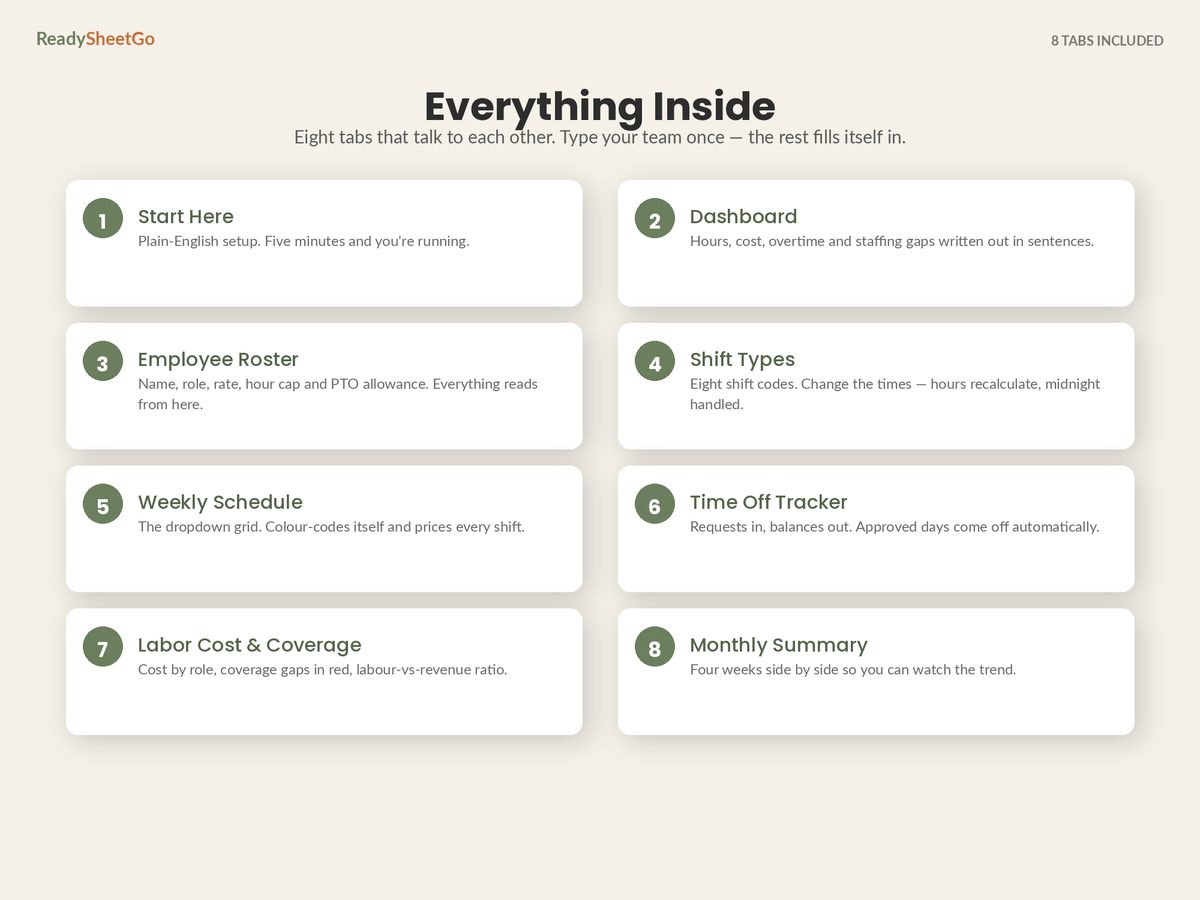
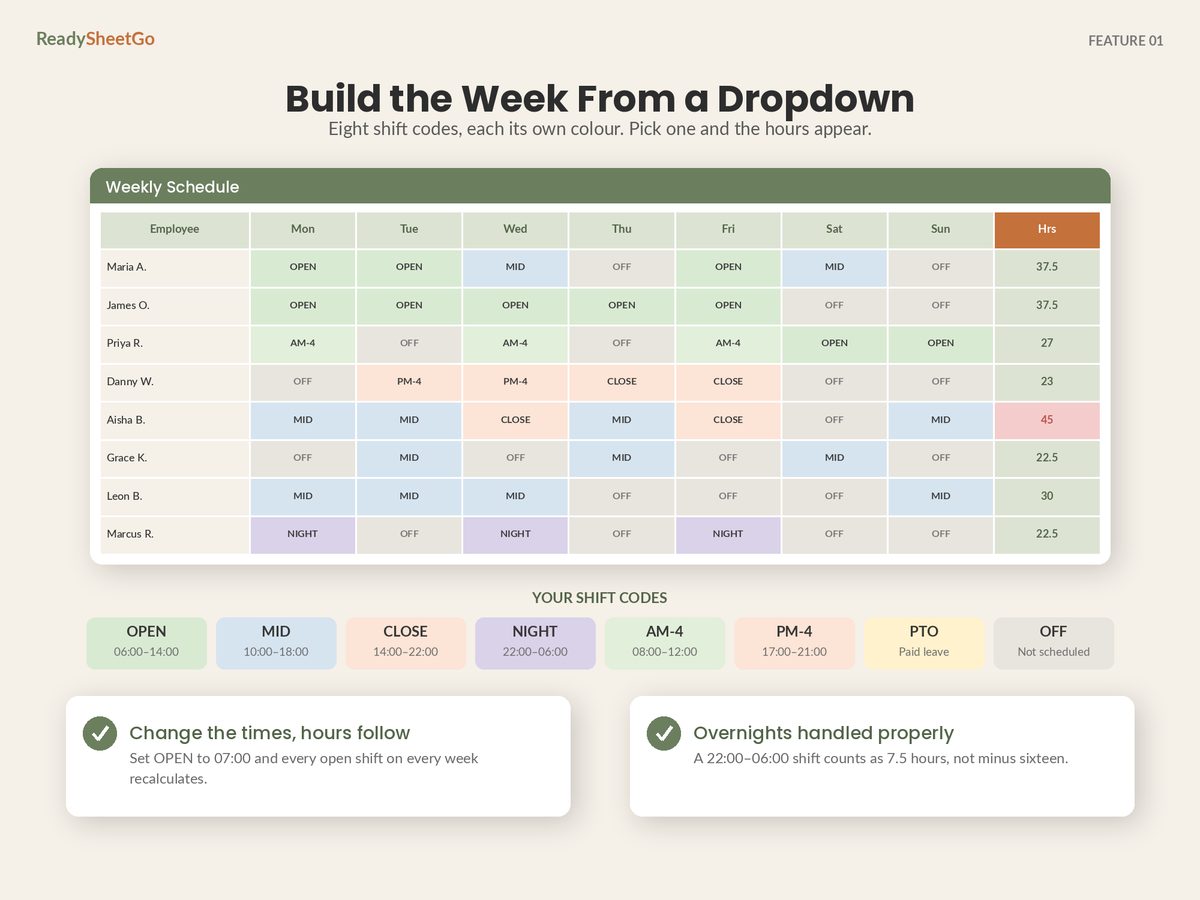
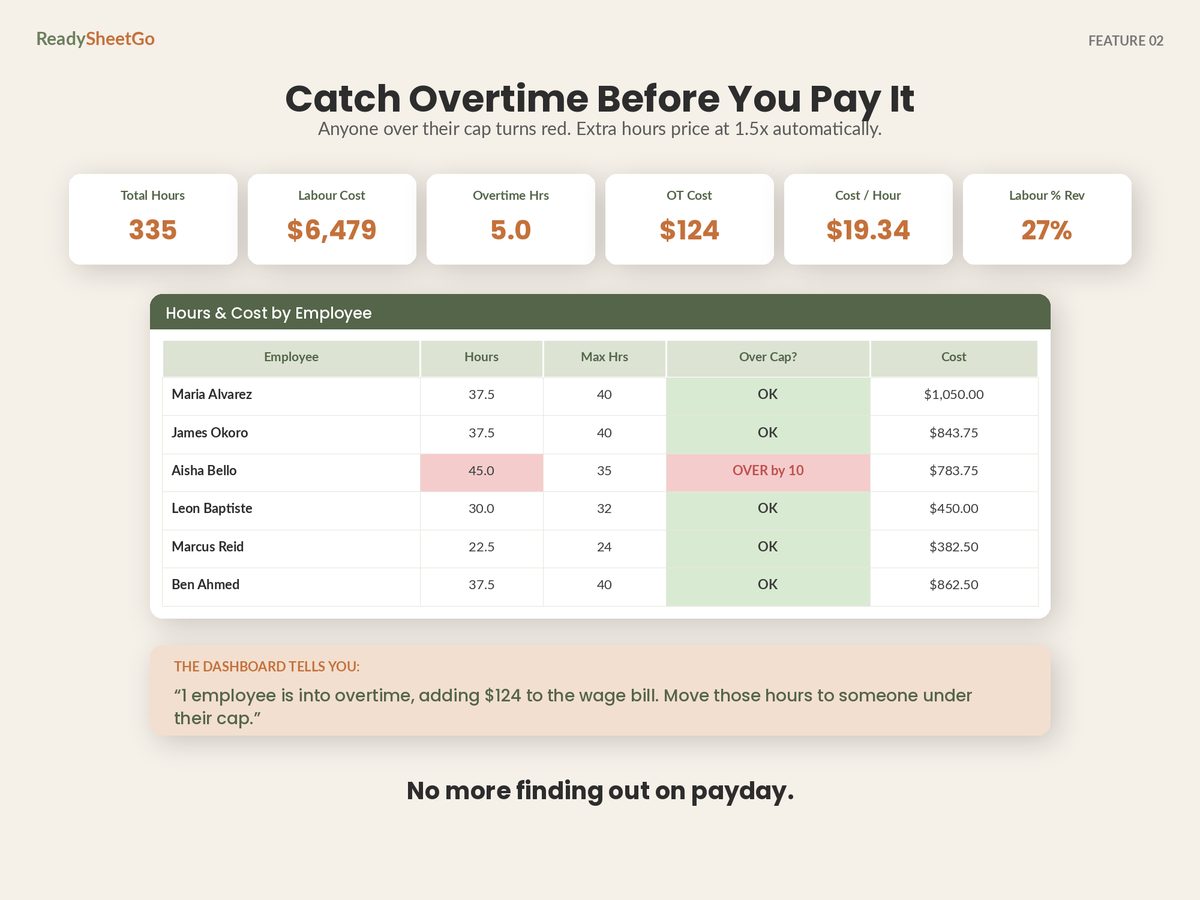
Eight ready-built tabs with 460+ formulas already written and tested, and a full twelve-person sample week pre-filled. Shift Types with eight codes ready to go and overnight shifts handled correctly. An Employee Roster holding rates, weekly hour caps, PTO allowance and availability that every other tab reads from. A Weekly Schedule dropdown grid that colour-codes itself and returns hours, overtime and cost per person as you build it. A Time Off Tracker keeping approved and pending apart. Labor Cost & Coverage showing headcount per role per day against your minimum, cost by role, and labour as a percentage of revenue. A Monthly Summary stacking four weeks. A Dashboard that reads the week back to you in sentences.
Unlimited employees, no per-seat pricing, ever. Nothing password-locked — every formula visible and editable, which is the one thing a subscription will not give you. Works in Excel, Google Sheets and Apple Numbers. No macros, no add-ons, no account to create.
Is a spreadsheet good enough for employee scheduling?
For roughly five to thirty hourly staff at one site, usually yes — because the difficult part of scheduling is arithmetic, and arithmetic is what a spreadsheet is for. Hours per person, overtime against a threshold, cost per shift, coverage by role, labour as a percentage of takings: a sheet does all of that, and shows you the formula behind every answer. It stops being adequate at specific capabilities rather than at a headcount, and those capabilities are notifications, self-service swaps, a timeclock and an audit trail.
How much does employee scheduling software cost?
Most of it is priced per employee per month, typically a few dollars per head, sometimes with a base platform fee on top and usually with the useful features on a higher tier. That structure matters more than the headline rate, because the cost scales with the thing you want to grow. Multiply the quoted per-head rate by your actual headcount and by twelve before comparing, and check specifically whether staff who work occasionally still count as billable seats — in seasonal businesses that detail can double the real annual figure.
What can scheduling software do that a spreadsheet cannot?
Four things, essentially. It pushes the schedule to staff phones and notifies them of changes. It lets employees request swaps and pick up open shifts themselves, with approval routed to you. It runs a timeclock, so scheduled hours can be compared against hours actually worked. And it keeps an audit trail of who changed what and when. None of the four can be built into a spreadsheet, and all four are about communication rather than calculation.
Can I use both a spreadsheet and scheduling software?
Yes, and for a lot of small businesses it is the sensible arrangement. Let the app do distribution — phones, swaps, clock-ins — and keep the spreadsheet for the thinking: cost modelling before you commit, labour percentage against expected revenue, role mix, four-week trend. Entry-level scheduling apps are often weakest at exactly the analysis a sheet is best at, because they are built to send a rota rather than to answer what it costs.
Price the Schedule Before You Post It, Not After Payroll Runs
The Employee Schedule, Shift Planner & Time-Off Tracker — 8 ready-built tabs with 460+ formulas already written and tested, and a full sample week for a 12-person team pre-filled so you can see it working before you type anything. An Employee Roster holding name, role, hourly rate, weekly hour cap, PTO allowance and availability notes — every other tab reads from this one list; a Shift Types tab with eight codes already set up (OPEN, MID, CLOSE, NIGHT, AM-4, PM-4, PTO, OFF) where you change the start and end times and the paid hours recalculate, unpaid break deducted, and overnight shifts that cross midnight handled correctly; a Weekly Schedule dropdown grid where every shift colour-codes itself, daily hours and headcount total at the bottom and each person's hours, overtime hours and cost appear on the right; a Time Off Tracker logging holiday, sick and personal requests as approved, pending or denied, with balances that maintain themselves and pending days counted separately so nothing gets double-booked; a Labor Cost & Coverage tab showing people scheduled per role per day against a minimum you set, with anything short flagged red, cost broken down by role, and your labour-to-revenue percentage with a verdict; a Monthly Summary putting four weeks side by side with hours, overtime, cost and labour percentage plus a plain-English read on whether the wage bill is climbing; and a Dashboard returning total hours, total labour cost, overtime hours and cost, shifts filled, average cost per hour and labour percentage, then saying in sentences which day is busiest, which is priciest, who is over their cap and where the coverage gaps are. Set your own overtime threshold and multiplier. Unlimited employees, no per-seat pricing. Print-ready weekly schedule for the break room wall. Works in Excel, Google Sheets and Apple Numbers, no macros and no add-ons.