Employee Schedule Spreadsheet for a Small Business: Price the Week Before You Post It
Most small businesses find out what the schedule cost about ten days after they posted it, when payroll runs and the number is bigger than expected. By then it is a historical fact. Nobody is going to un-work Saturday.
The whole point of building the schedule in a spreadsheet rather than on a whiteboard is that the arithmetic can happen while you are still deciding. You put Aisha on a sixth shift and a cell turns red before you commit to it, not after. You notice on Thursday morning that nobody senior is on the floor, rather than at 11am on Thursday when nobody senior is on the floor.
This is how to build that sheet, worked end to end on a twelve-person team.
The Worked Example: One Week, Twelve People
Everything below runs on the same made-up business — a café with a twelve-person hourly team. The rates and shifts are invented; the arithmetic is the arithmetic.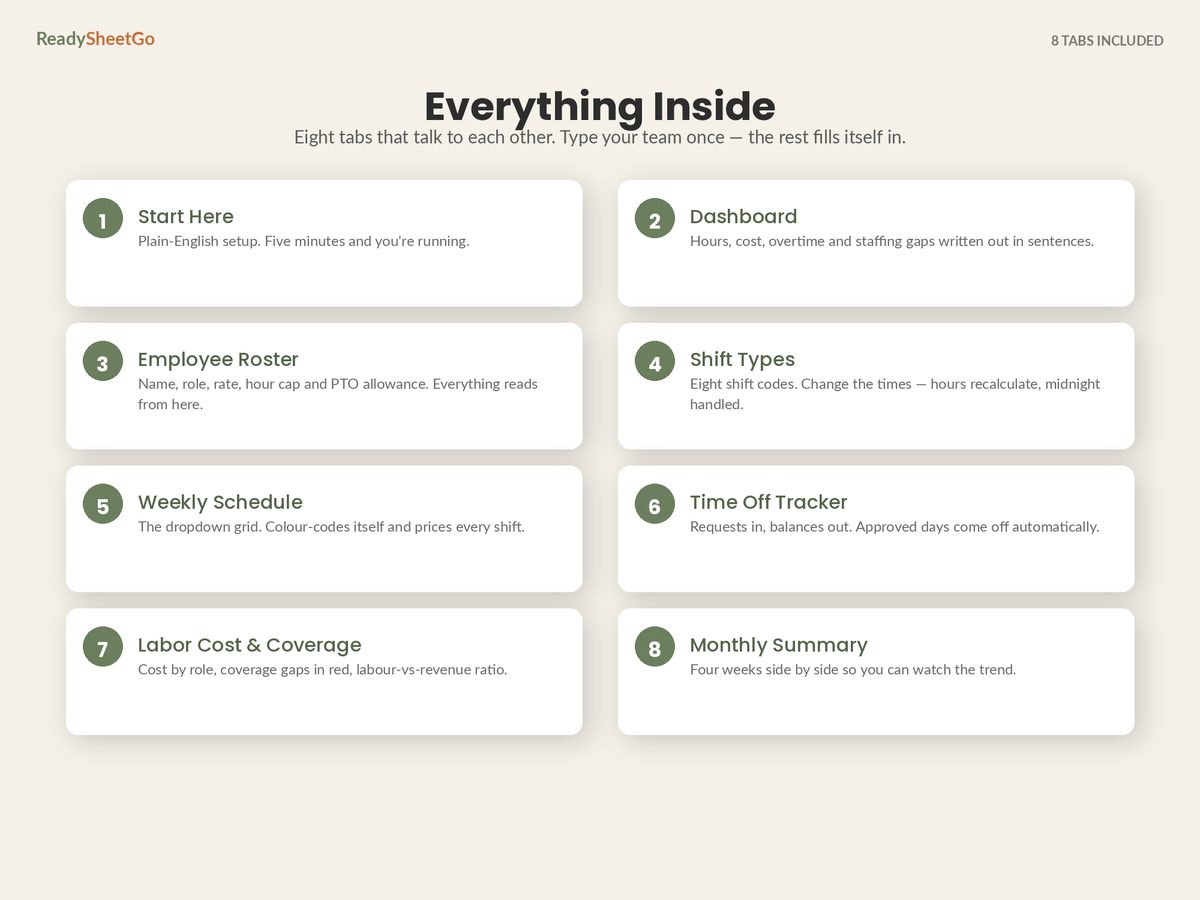
Six shift codes, defined once:
| Code | Shift | Start | End | Unpaid break | Paid hours |
|---|---|---|---|---|---|
| OPEN | Opening | 06:00 | 14:00 | 0.5 | 7.5 |
| MID | Mid | 10:00 | 18:00 | 0.5 | 7.5 |
| CLOSE | Closing | 14:00 | 22:00 | 0.5 | 7.5 |
| NIGHT | Overnight | 22:00 | 06:00 | 0.5 | 7.5 |
| AM-4 | Morning part | 08:00 | 12:00 | 0 | 4.0 |
| PM-4 | Evening part | 17:00 | 21:00 | 0 | 4.0 |
Define these once and never type an hours figure again. Change the close time from 22:00 to 23:00 and every closing shift in the file reprices itself.
Now the week, with the overtime threshold set at 40 hours and the multiplier at 1.5:
| Employee | Role | Rate | Hours | Regular | OT | Week cost |
|---|---|---|---|---|---|---|
| Maria Alvarez | Manager | $28.00 | 37.5 | 37.5 | 0 | $1,050.00 |
| James Okoro | Cook | $22.50 | 37.5 | 37.5 | 0 | $843.75 |
| Priya Raman | Cook | $21.00 | 27.0 | 27.0 | 0 | $567.00 |
| Danny Whelan | Server | $16.00 | 23.0 | 23.0 | 0 | $368.00 |
| Aisha Bello | Server | $16.50 | 45.0 | 40.0 | 5.0 | $783.75 |
| Tomas Lindqvist | Server | $16.00 | 15.0 | 15.0 | 0 | $240.00 |
| Owen Carty | Server | $16.25 | 30.0 | 30.0 | 0 | $487.50 |
| Grace Kim | Host | $15.50 | 22.5 | 22.5 | 0 | $348.75 |
| Sofia Marchetti | Host | $15.75 | 27.0 | 27.0 | 0 | $425.25 |
| Leon Baptiste | Cashier | $15.00 | 30.0 | 30.0 | 0 | $450.00 |
| Nadia Farrell | Cashier | $15.25 | 22.5 | 22.5 | 0 | $343.13 |
| Marcus Reid | Cleaner | $17.00 | 22.5 | 22.5 | 0 | $382.50 |
| Total | 339.5 | 334.5 | 5.0 | $6,289.63 |
That bottom row is the number you want before you post, not after. And the average works out at $18.53 an hour across the whole schedule — a figure most owners have never seen, because it is not any one person’s rate.
The Five Columns That Do All the Work
You do not need a complicated file. You need five calculated columns and the discipline to keep the inputs true.
1. Paid hours per shift. Look up the shift code, return its hours. The subtlety is the overnight: 22:00 to 06:00 is 8 hours, but end minus start gives you minus 16. Take the difference modulo 24 and the sign problem disappears. Then subtract the unpaid break. Test this with one NIGHT shift before you trust the file — it is the single most common silent bug in a homemade schedule sheet.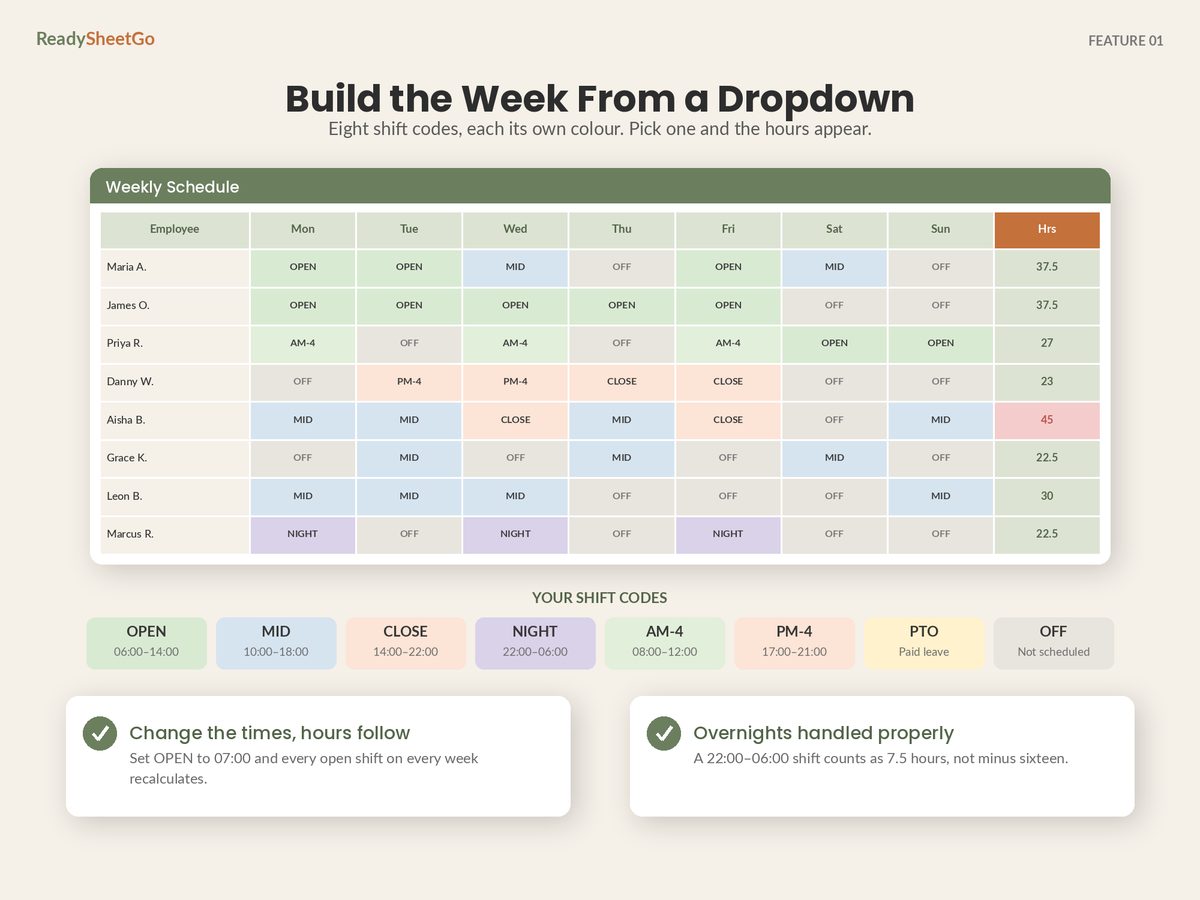
2. Weekly hours per person. Sum the seven day cells across the row. This is the column that tells you whether the schedule you have drawn is the schedule you meant to draw.
3. Overtime hours. MAX(0, weekly hours − threshold). Put the threshold in a cell rather than hard-coding 40, because your state may not be 40 and your business may choose a lower internal trigger.
4. Cost per person. Regular hours × rate, plus overtime hours × rate × multiplier. On Aisha’s row: 40 × $16.50 = $660.00, plus 5 × $24.75 = $123.75, giving $783.75.
5. A cap flag. Every person has a maximum weekly hours figure — contracted, visa-limited, student, or just what they told you they wanted. Compare weekly hours against that cap and turn the cell red when it is exceeded. This is different from the overtime flag and catches a different mistake: Grace is on 22.5 hours here, which is fine — but if the cap you agreed with her was 20, you have broken a promise without costing yourself a penny in premium, and nothing else in the file will tell you.
Five columns. Everything else in a schedule file is a read-out of these.
Coverage: The Half Nobody Builds
Cost is the half everybody builds. Coverage is the half that actually ruins a Saturday, and it needs a second small table: people scheduled per role, per day, against a minimum you set.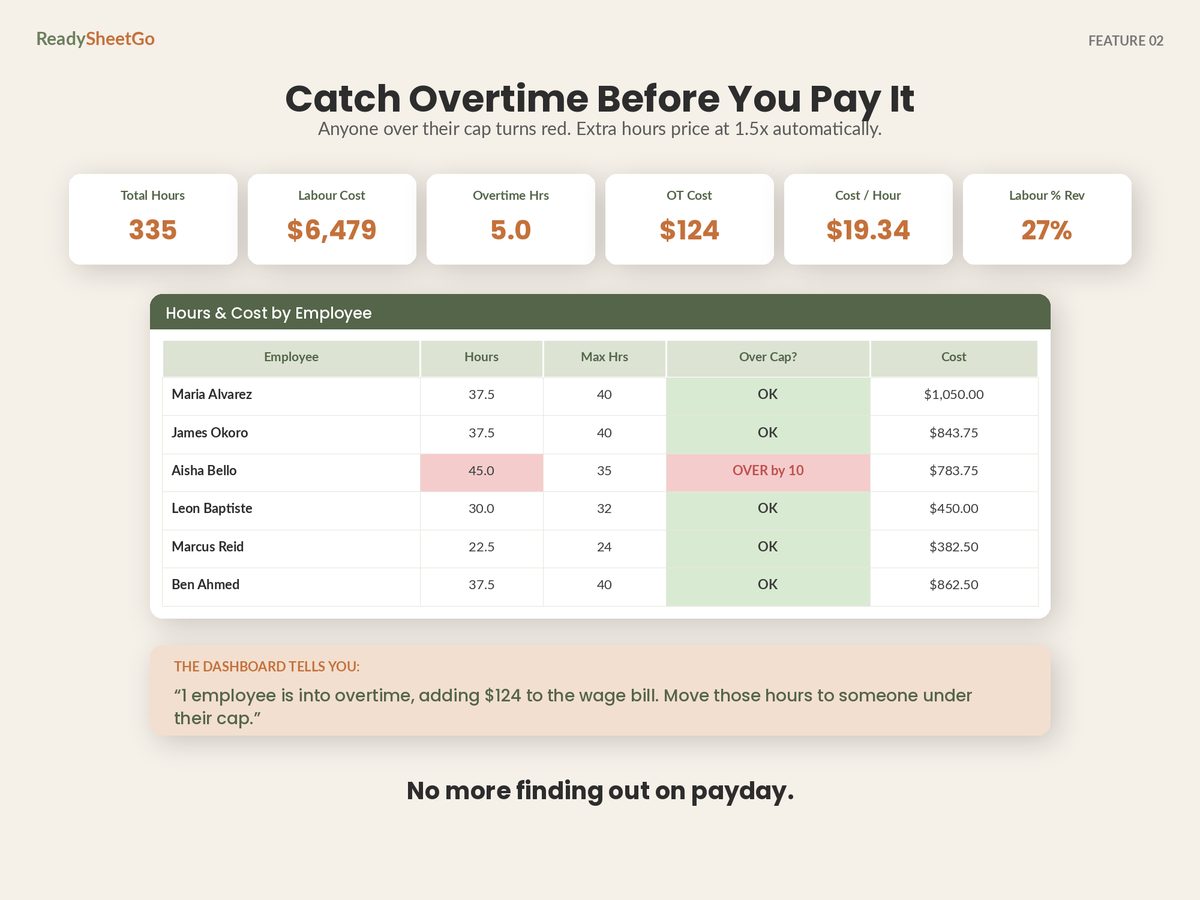
| Role | Mon | Tue | Wed | Thu | Fri | Sat | Sun | Min needed |
|---|---|---|---|---|---|---|---|---|
| Manager | 1 | 1 | 1 | 0 | 1 | 1 | 0 | 1 |
| Cook | 2 | 1 | 2 | 1 | 2 | 1 | 1 | 2 |
| Server | 2 | 2 | 2 | 3 | 3 | 2 | 2 | 2 |
| Host | 0 | 1 | 1 | 2 | 1 | 2 | 1 | 1 |
| Cashier | 1 | 1 | 1 | 1 | 1 | 1 | 1 | 1 |
| Cleaner | 1 | 0 | 1 | 0 | 1 | 0 | 0 | 0 |
Those row totals are the same 49 shift-days as the hours table above, counted a different way — which is the point of building the matrix from the grid rather than typing it.
Seven cells are below the minimum: Manager on Thursday and Sunday, Cook on Tuesday, Thursday, Saturday and Sunday, Host on Monday. Seven holes in a schedule that looked finished, and every one of them is invisible in the cost table — the wage bill is lower because of them, which is exactly why cost-only scheduling drifts toward being quietly short-staffed.
The Cook row is the real finding here, and it is a staffing decision rather than a scheduling one: two cooks with 64.5 hours between them cannot put two people on the line seven days a week, whatever order you arrange their shifts in. No amount of moving cells fixes that — it is either a third cook, a shorter trading week, or a minimum of one on the quiet days, made deliberately rather than by accident.
The formula is a single conditional count across the schedule grid: count the cells in that day’s column where the person’s role matches the row and the shift code is not OFF or PTO. Two things worth deciding deliberately:
- PTO does not count as coverage. Somebody on paid holiday costs you money and staffs nothing. Any schedule sheet that counts a PTO day as a body on the floor will tell you Thursday is covered when it is not.
- A four-hour part shift is not a full body. If your coverage minimum means “someone on the floor at 7pm”, a person on AM-4 does not satisfy it. Either count coverage by time band rather than by day, or accept that the day-level count is a coarse check and eyeball the evenings.
Labour as a Percentage of Revenue
One more input turns the file from a scheduling tool into a management tool: expected takings for the week.
$6,289.63 ÷ $22,000 = 28.6%
That single percentage is the number to watch week over week, and it beats watching the dollar figure, because a bigger wage bill in a busier week is not a problem — a bigger wage bill in a flat week is. What counts as healthy varies enormously by trade, so build your own baseline from your own last twelve weeks rather than adopting somebody else’s rule of thumb.
Be careful about which cost you divide, though. Wages alone understate what staff actually cost you by several percentage points once employer payroll taxes and insurance are in. Working out labour cost percentage properly, with the burden included takes the same example above from 28.6% to 32.1% — and if you have been benchmarking the first number against advice written about the second, you have been flattering yourself for months.
The Dashboard Read
Once those tables exist, a dashboard is just sentences generated from them. The useful ones:
- Busiest day and priciest day — often not the same day, and the gap between them is where scheduling money hides. If Wednesday costs more than Saturday earns, something is mis-shaped.
- Overtime hours and overtime cost, separately. Five hours of overtime sounds trivial. It cost $123.75, of which $41.25 is pure premium — money spent on nothing but the timing of the hours.
- Anyone over their cap, by name.
- How many time-off decisions are still pending. A pending request is a coverage gap you have not yet found out about.
- Average cost per hour — $18.53 here. Track it. A rising average means your mix is drifting senior, which may be exactly right or may be an accident.
Building It: The Order That Saves Re-Typing
- Shift types first. Six or eight codes with start, end and unpaid break. Ten minutes, once, and it removes every manual hours calculation forever.
- Roster second. Name, role, hourly rate, weekly hours cap, PTO allowance, availability notes. Every other tab reads from this list, so a rate change happens in one cell.
- Then the grid. Dropdowns of shift codes, people down the side, days across the top. Never free-typed times — a typo in a free-typed schedule silently corrupts a cost.
- Coverage minimums. One number per role. This takes two minutes and is the step people skip.
- Time-off log alongside, with approved and pending kept apart, so an unanswered request is visible rather than forgotten.
- Revenue expectation last, so the labour percentage has something to divide into.
Do it in that order and nothing gets typed twice.
Four Failure Modes Worth Designing Out
Free-typed hours. Somebody writes “9-5” in a cell and the file has no idea what that means. Dropdowns only.
Rates living in the schedule. If the hourly rate is typed on the schedule grid instead of read from the roster, a raise means finding every historical week. Rates belong in exactly one place.
Overnight shifts. Covered above, and worth repeating because a schedule that prices a NIGHT shift as zero hours will look cheaper and pass every eyeball test.
Copying last week and editing. Reasonable, and how most schedules actually get built — but copy the structure, not the time-off decisions. Last week’s approved holiday sitting in this week’s grid is how somebody gets scheduled while they are away.
Where the Money Actually Is
Three things move the number, in rough order of size.
Overtime you did not intend. Catching overtime before you post the schedule is the highest-value ten minutes in the whole process — in this example, moving five hours off Aisha and onto Tomas, who is nowhere near the threshold, saves $43.75 a week for an identical amount of work done.
Role mix. Break the wage bill down by role and the shape becomes obvious:
| Role | Hours | Cost | % of wage bill | Avg $/hr |
|---|---|---|---|---|
| Server | 113.0 | $1,879.25 | 29.9% | $16.63 |
| Cook | 64.5 | $1,410.75 | 22.4% | $21.87 |
| Manager | 37.5 | $1,050.00 | 16.7% | $28.00 |
| Cashier | 52.5 | $793.13 | 12.6% | $15.11 |
| Host | 49.5 | $774.00 | 12.3% | $15.64 |
| Cleaner | 22.5 | $382.50 | 6.1% | $17.00 |
One manager on one set of shifts is 16.7% of the entire wage bill. That is not an argument for scheduling fewer managers; it is an argument for knowing the number before you add a second one.
Time-off collisions. Two people off the same Saturday costs nothing on the schedule and everything on the floor. Scheduling around time-off requests without leaving coverage gaps is a process problem more than a formula problem, and it is where most of the week’s chaos actually originates.
And if you are weighing the sheet against a per-employee subscription, the honest comparison — including the four things an app genuinely does that a spreadsheet cannot — is here.
The Thing Worth Remembering
A schedule that lists who is working is a rota. A schedule that prices itself while you build it is a decision tool, and the difference is about five formulas and one coverage table.
Post the week knowing the number: total hours, overtime hours, cost, coverage gaps by role, and labour as a percentage of what you expect to take. Every one of those is available before you post, which is the only time any of them can still be changed.
Featured on ReadySheetGo
Employee Schedule, Shift Planner & Time-Off Tracker — $14.99
Eight ready-built tabs with 460+ formulas already written and tested, and a full sample week for a twelve-person team pre-filled so you can see it working before you type a thing.
Shift Types holds eight codes ready to go — OPEN, MID, CLOSE, NIGHT, AM-4, PM-4, PTO, OFF. Change a start or end time and paid hours recalculate, unpaid break deducted, with overnight shifts that cross midnight handled correctly. The Employee Roster holds name, role, hourly rate, weekly hours cap, PTO allowance and availability notes, and every other tab reads from it. The Weekly Schedule is the dropdown grid: shifts colour-code themselves, daily hours and headcount total at the bottom, and each person’s hours, overtime hours and cost appear on the right. Set your own overtime threshold and multiplier.
The Time Off Tracker logs holiday, sick and personal requests as approved, pending or denied, with balances that maintain themselves and pending days counted separately so nothing gets double-booked. Labor Cost & Coverage shows people scheduled per role per day against a minimum you set, flags anything short in red, breaks cost down by role and returns your labour-to-revenue percentage with a verdict. Monthly Summary puts four weeks side by side. The Dashboard returns total hours, labour cost, overtime hours and cost, shifts filled, average cost per hour and labour percentage — then says in plain sentences which day is busiest, which is priciest, who is over their cap and where the gaps are.
Unlimited employees, no per-seat pricing, ever. Print-ready weekly schedule for the break room wall. Nothing is password-locked — every formula is visible and editable. Works in Excel, Google Sheets and Apple Numbers. No macros, no add-ons, no subscription.
Get the Employee Schedule, Shift Planner & Time-Off Tracker →
Frequently Asked Questions
What should an employee schedule spreadsheet actually track?
Five things per person, and everything else is decoration: hourly rate, a maximum weekly hours cap, availability, the shift assigned to each day, and paid hours per shift after unpaid breaks. Those five generate every number that matters — weekly hours per person, who crosses the overtime threshold, the cost of each person's week, the cost of the whole schedule, and how many people are on each role each day. A grid of names and shift times with no rates in it is a rota, not a schedule tool: it cannot tell you the one thing you need before you post it, which is what it costs.
How do I calculate paid hours for a shift that crosses midnight?
Subtracting the start time from the end time gives a negative number for an overnight shift, which is why so many homemade schedule sheets return nonsense for a 22:00–06:00 shift. The fix is to take the difference modulo 24 hours, so 06:00 minus 22:00 resolves to 8 hours rather than minus 16, then subtract the unpaid break. Any schedule sheet you build or buy should be tested with one overnight shift before you trust it with a payroll number.
How far in advance should a small business post the schedule?
Two weeks ahead is a common working arrangement in hourly trades, and one week is the practical floor — below that, availability conflicts and swap requests arrive after the schedule is already live, which is where most of the churn comes from. Some cities and states also have predictive-scheduling rules that require a set amount of advance notice and pay a premium when you change a posted shift late, so check the rules where you actually operate before settling on a notice period.
Can I run staff scheduling in Google Sheets rather than an app?
Yes, and for a team of roughly five to thirty hourly staff it works well, because the hard part of scheduling is arithmetic — hours, overtime, coverage counts and cost — and that is exactly what a spreadsheet does. What a sheet cannot do is push a notification to somebody's phone, let two staff swap a shift between themselves, or run a timeclock. If those matter more than the arithmetic, you want an app; if the arithmetic is what keeps catching you out, a sheet is both cheaper and more transparent.