Year-End Business Close Checklist Spreadsheet for a Clean CPA Handoff
Every January the same email arrives from your accountant: which of these two balances is the real one, what is this four-thousand-dollar transfer, do you have a W-9 for this contractor, and did anyone count the stock? Each question costs you a day. A year-end business close checklist spreadsheet exists so you answer all of them once, before you send anything.
This guide organises your records. It is not tax, legal or accounting advice. Rules and deadlines vary by entity type and year, so confirm specifics with your accountant.
Full walkthrough of the template used in this guide.
Recording the year is not the same as closing it
Your bookkeeping sheet or software records transactions as they happen. A close is a separate project that starts where the ledger stops. It asks whether what you recorded is complete, correct and provable:
- Does each account’s book balance match its statement?
- Is every transaction categorised, or are there mystery items sitting in a queue?
- Was inventory counted, so cost of goods sold is a real number?
- Have assets bought this year been recorded and depreciated?
- Do you know which contractors need forms and whose paperwork is missing?
- Does the balance sheet actually balance?
- Is every document your accountant wants requested, received and stored somewhere you can find it?
If you cannot answer yes to all seven, your accountant will find out for you, at their hourly rate and on their timeline. The five-phase checklist below puts you in front of that.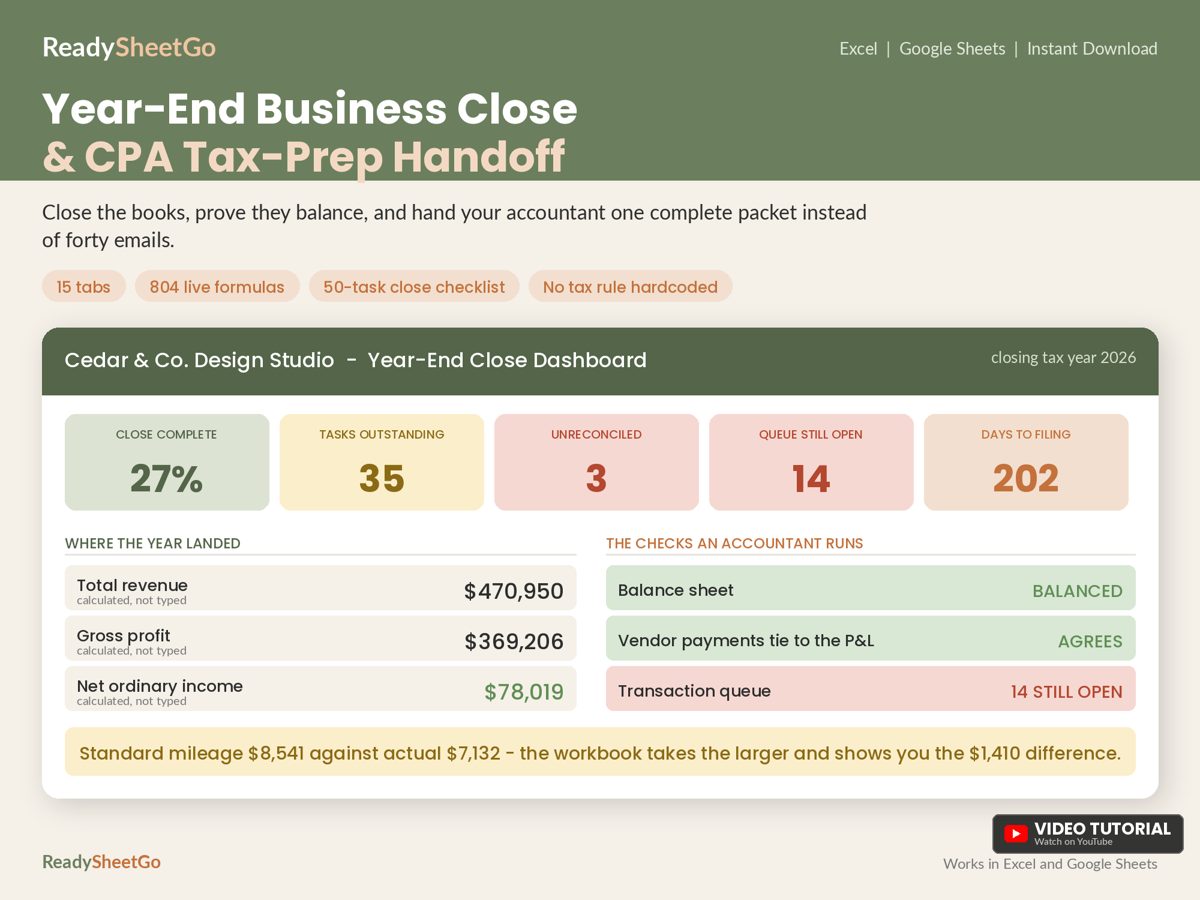
The five phases, in the order that works
Order matters because each phase feeds the next. Reconcile first, because you cannot categorise reliably from an unreconciled account. Report last, because reports are only as good as the work before them.
Phase 1: Reconcile
Match every bank, card and loan account to its December statement. The formula is the same for each account:
Statement ending balance, minus outstanding checks and payments, plus deposits in transit, should equal your book balance.
Worked example for a fictional candle business, Harbor Lane Candle Co. (all numbers in this guide are illustrative):
| Line | Amount |
|---|---|
| Statement ending balance | $18,857.67 |
| Less: checks written but not yet cleared | -$540.00 |
| Plus: deposit made 31 December, posted 2 January | +$102.88 |
| Adjusted bank balance | $18,420.55 |
| Book balance in your sheet | $18,420.55 |
| Variance | $0.00 |
A zero variance means the account is done. Anything else becomes a flagged line you chase. If you have fourteen accounts, you want fourteen rows, each showing statement balance, book balance and variance, with a red flag on any non-zero line. Our walkthrough on reconciling a business bank account with a bookkeeping spreadsheet goes deeper on tracking down a stubborn variance.
Phase 2: Categorise
Every ledger has a pile of items you could not place: a transfer with no memo, a deposit from a name you do not recognise, a card charge you suspect was personal. Do not hide them in “Miscellaneous”. Put them in a queue with a reason code and a resolution note, then work the queue to zero. The full method, including how to prioritise by dollar size, is in how to clear uncategorized transactions before tax time.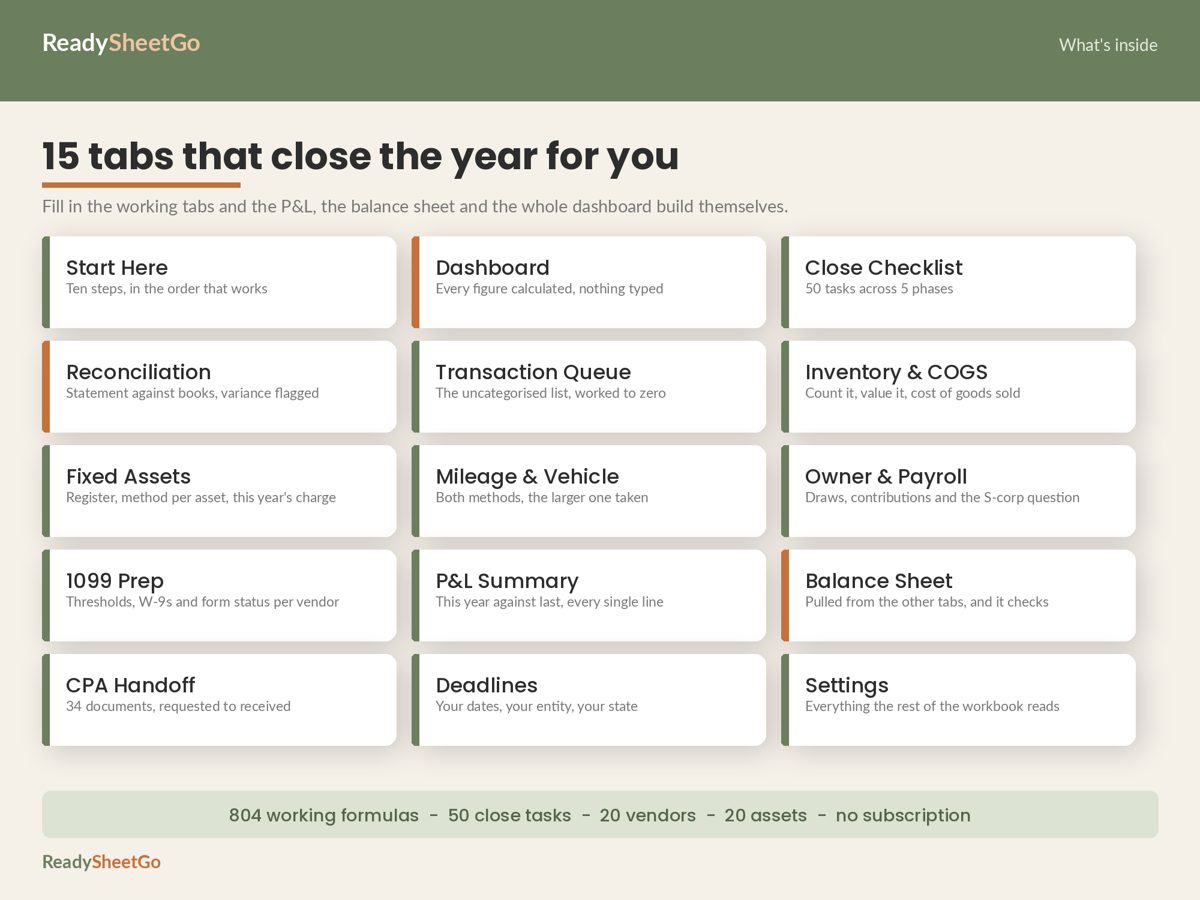
The reason codes are the useful part. Useful ones include: transfer between own accounts, owner draw or contribution, possible personal expense, missing receipt, unknown deposit, contractor payment needing a W-9, refund, and duplicate. Once an item has a reason, it has a next action.
Phase 3: Adjust
Adjustments are the entries your daily bookkeeping does not capture. For most small businesses, four matter.
Inventory and cost of goods sold. If you hold stock, count it. Cost of goods sold equals beginning inventory plus purchases during the year minus ending inventory.
| Line | Amount |
|---|---|
| Beginning inventory (1 Jan) | $12,400.00 |
| Plus: purchases during the year | $38,950.00 |
| Goods available for sale | $51,350.00 |
| Less: ending inventory (counted 31 Dec) | $14,200.00 |
| Cost of goods sold | $37,150.00 |
A step-by-step count method, with a per-SKU example, is in year-end inventory count and cost of goods sold, worked example.
Fixed assets and depreciation. List what you bought this year that will last more than a year: laptop, camera, oven, vehicle. Record the cost, date placed in service and a depreciation method per asset. As a simple illustration only, an $1,800 laptop on a five-year straight-line schedule is $360 a year. Tax depreciation rules often differ from this simple schedule, including special first-year deductions, so treat your register as the record and let your accountant choose the treatment.
Vehicle. If you drive for the business, compute your deduction both ways from the same log, standard mileage and actual expenses, and see which is larger. The arithmetic is yours; eligibility to use each method has rules, so confirm with your accountant. Our worked comparison for drivers is in standard mileage vs actual expenses.
Owner and payroll items. Total owner draws and contributions for the year, and total any payroll you ran. Owner draws are not an expense, which is exactly why they need their own line rather than sitting in the queue.
Phase 4: Report
Now produce the two statements your accountant will ask for.
Profit and loss. Using the example figures:
| Line | Amount |
|---|---|
| Revenue | $120,000.00 |
| Cost of goods sold | $37,150.00 |
| Gross profit | $82,850.00 |
| Operating expenses | $51,300.00 |
| Net income | $31,550.00 |
| Net margin (31,550 / 120,000) | 26.3% |
If you set aside tax at an assumed 24 percent of net income (an assumption for planning, not your actual rate), that is $7,572.00 to compare with what you have already paid in estimates.
Balance sheet. Assets must equal liabilities plus equity. This is the proof that the rest of your work hangs together. If it does not balance, something upstream is wrong, and you want to know now. Our guide to what to do when the balance sheet does not balance at year end shows how to find the difference by its size.
Phase 5: File and hand off
This phase is mostly paperwork logistics. Build a document list, and give every document a status (requested, received, stored) and a location. A typical packet includes:
- Profit and loss, this year and prior year
- Balance sheet
- Reconciled statements for every account
- Fixed asset purchase list with invoices
- Mileage log
- Inventory count totals
- Payroll reports and owner draw summary
- Contractor list with W-9 status and totals paid
- Loan statements showing interest paid
- Prior-year return
The complete version of this list, with what each document is for, is in what to send your accountant at tax time. Contractors deserve their own pass: total each payee, compare with the reporting threshold, and chase missing W-9s early. The method is in our 1099 contractor payment tracker guide.
A fifty-task checklist beats a mental one
The reason closes drag on is not difficulty, it is dependency. You cannot finish the profit and loss until inventory is counted, you cannot count inventory until you stop shipping for a day, and you cannot send the packet until the W-9 arrives. A task list with an owner, a due date and a flag for “my accountant needs this” turns a vague dread into a sorted queue.
A simple structure for each task row:
| Column | Example |
|---|---|
| Phase | 1 Reconcile |
| Task | Reconcile business checking to December statement |
| Owner | You |
| Due | 12 January |
| Status | Not started / In progress / Blocked / Done / N/A |
| Accountant needs it? | Yes |
Then add one formula that counts the tasks marked Done divided by the tasks not marked N/A. That percentage is your progress bar, and a second count of “accountant needs it” tasks still open tells you what is actually blocking the handoff.
Set the warning window once
Deadlines cause the most expensive mistakes because they arrive on someone else’s calendar. Put each date you care about in a deadline table with a countdown formula: the due date minus today. Add one setting cell, for example 14 days, and a conditional format that turns any countdown red when it falls inside that window. Change the cell once and every countdown in the workbook adjusts.
Copy-ready mini close checklist
Paste this into a sheet today and tick it off:
- Download December statements for every bank, card and loan account.
- Reconcile each account; record the variance.
- Move every unexplained transaction into a queue with a reason code.
- Work the queue from the largest dollar amount down.
- Count inventory; record units and unit cost per item.
- Calculate cost of goods sold.
- List this year’s equipment purchases with date and cost.
- Total business and personal miles from your log.
- Total owner draws, contributions and payroll.
- Total payments per contractor; note who has no W-9.
- Build the profit and loss.
- Build the balance sheet and confirm it balances.
- List every document your accountant asked for, with status.
- Send the packet once.
What a finished close looks like
You should end with a checklist at one hundred percent for the items your accountant needs, every account at zero variance, an empty queue, a balance sheet that says it balances, and a document list with no “requested” rows left. If any of those is not true, you know which phase to reopen.
Where the spreadsheet does the work for you
Building this from scratch is a good weekend project, and the sections above give you the formulas. If you would rather start with it wired together, the Year-End Business Close and CPA Tax-Prep Handoff Workbook has 15 linked tabs and 804 working formulas, including the 50-task close checklist across five phases, a reconciliation tab with red variance flags, a transaction queue with ten reason codes, an inventory and cost of goods sold sheet that feeds the profit and loss, a fixed asset register, a vehicle tab that calculates both methods side by side, an owner and payroll tab, 1099 prep, a balance sheet that tells you in plain words whether it balances, and a 34-document CPA handoff tracker. It works in Excel and Google Sheets with no macros or add-ons.
Featured on ReadySheetGo
Year-End Business Close and CPA Tax-Prep Handoff Workbook — $19.99
Reconcile, clear the queue, count stock, check the balance sheet and track every document your accountant needs. Works in Excel and Google Sheets.
General information only, not tax, legal or accounting advice. Example figures are fictional.
Frequently Asked Questions
What is a year-end business close?
It is the set of steps that turns a year of recorded transactions into reports your accountant can file from: reconciling every account, clearing uncategorised transactions, counting inventory, posting depreciation, sorting contractor forms, producing a profit and loss and balance sheet, and gathering supporting documents. Recording the year and closing the year are different jobs.
When should I start closing my books for the year?
Starting in the last four to six weeks of the year gives you time to chase missing paperwork such as W-9s and receipts, and to make decisions while they can still change the outcome. Reconciliation itself can only be finished once December statements arrive, so split the work into a before-year-end pass and an after-year-end pass.
What do I send my CPA at year end?
Typically a profit and loss, a balance sheet, reconciled bank and card statements, a list of fixed asset purchases, a mileage log, inventory count totals, payroll and owner draw summaries, and a contractor list with W-9 status. Ask your accountant for their exact list, then track each document from requested to received.
Can I run a year-end close in Excel or Google Sheets?
Yes. A workbook with a task checklist, a reconciliation tab, a transaction queue, an inventory count sheet, a fixed asset register, and a balance sheet that checks itself covers the same steps as a paid close tool for a small business. This is record organisation, not tax or accounting advice.